NanoGPT Image Editor - Chrome Extension
🎨 One-click AI image editing on any webpage
A lightweight Chrome browser extension that lets you AI-edit any image directly while browsing the web.
What is this?
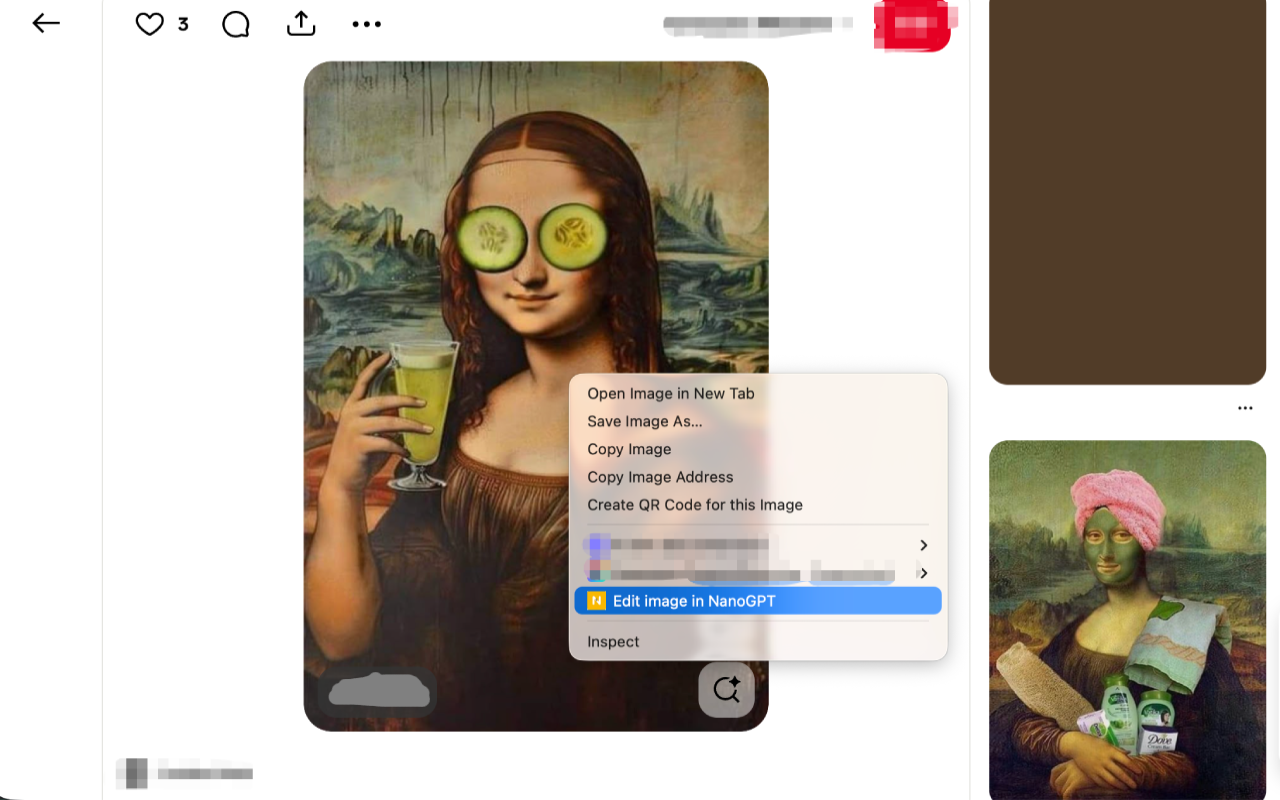
NanoGPT Image Editor is a lightweight Chrome browser extension that lets you AI-edit any image directly while browsing the web. See an image you want to modify? Right-click, select "Edit image in NanoGPT", and start creating instantly.
Why install it?
🚀 Say goodbye to tedious workflows
❌ The old way:
- 1Right-click and save image locally
- 2Open an image editing tool
- 3Upload the image
- 4Download after editing
✅ The new way:
- 1Right-click on the image
- 2Select "Edit image in NanoGPT"
- 3Start editing!
✨ Core Value
😫 Want to edit a great image but too many steps
✨ One right-click to the editor
😫 Constantly switching between browser and editor
✨ Opens in new tab, keeps your browsing state
😫 Privacy and security concerns
✨ Only processes when you act, collects zero data
👥 Who is it for?
Content Creators
Quickly grab and edit web images
Designers
Instantly AI-modify and expand reference images
Social Media Managers
Efficiently process web images for posting
Everyone
Anyone who wants to quickly enhance or modify any image they see
Features
Right-click Menu Integration
Trigger from any image with a right-click
Instant Editing
Opens NanoGPT in a new tab with image auto-loaded
AI-Powered
Leverage NanoGPT's powerful AI capabilities for image processing
Privacy First
No tracking, no collection, no storage of user data
Lightweight
Minimal resource usage, zero impact on browsing experience
How to Use
Browse any webpage
Right-click on the image you want to edit
Select "Edit image in NanoGPT"
Edit the image using AI tools in the new tab
Download your edited image
Use Cases
NanoGPT lets you AI-edit any image directly while browsing the web.
Browser Image Editing
Right-click any image on the web and edit it instantly with AI
Privacy Statement
We value your privacy:
FAQ
Will the extension affect browser performance?
No. The extension only activates when you right-click an image — it uses zero resources otherwise.
What image formats are supported?
All web-displayable image formats including JPG, PNG, GIF, WebP, and more.
Where are edited images saved?
After editing, you can download directly from NanoGPT to your local device.